Introduction
Selecting your first video editing software can feel overwhelming with dozens of options available in the market. The right choice depends on your specific needs, budget, technical skills, and the type of content you plan to create. This comprehensive guide will help you navigate the decision-making process and choose software that aligns with your goals.
Understanding Your Editing Needs
Before exploring software options, assess your requirements. Are you editing content for YouTube, social media, professional clients, or personal projects? Short-form content creators need different features than documentary filmmakers. Consider your output frequency, video length, and quality requirements. Understanding these parameters will narrow your options significantly and prevent investing in overly complex or inadequate tools.
Budget Considerations
Video editing software ranges from completely free to several hundred dollars. Free options like DaVinci Resolve, iMovie, and CapCut offer robust features suitable for beginners. Mid-range options like Filmora and Vegas Pro cost between $50-$300, providing additional effects and support. Professional software like Adobe Premiere Pro and Final Cut Pro requires subscriptions or one-time payments exceeding $300. As a beginner, starting with free or affordable options allows you to develop skills before committing to expensive software.
Operating System Compatibility
Your computer’s operating system significantly influences your choices. Mac users have access to Final Cut Pro and iMovie, both optimized for Apple hardware. Windows users can choose from Premiere Pro, Vegas Pro, Filmora, and DaVinci Resolve. Some software like Premiere Pro and DaVinci Resolve work across both platforms, offering flexibility if you switch systems later. Verify system requirements to ensure your computer can handle the software smoothly.
Learning Curve and User Interface
The learning curve varies dramatically between programs. iMovie and CapCut feature intuitive interfaces perfect for absolute beginners, allowing you to start editing within minutes. Filmora balances simplicity with advanced features, making it ideal for progressing beginners. Professional software like Premiere Pro and DaVinci Resolve require more time to master but offer greater creative control. Consider available tutorials, documentation, and community support when evaluating ease of learning.
Essential Features for Beginners
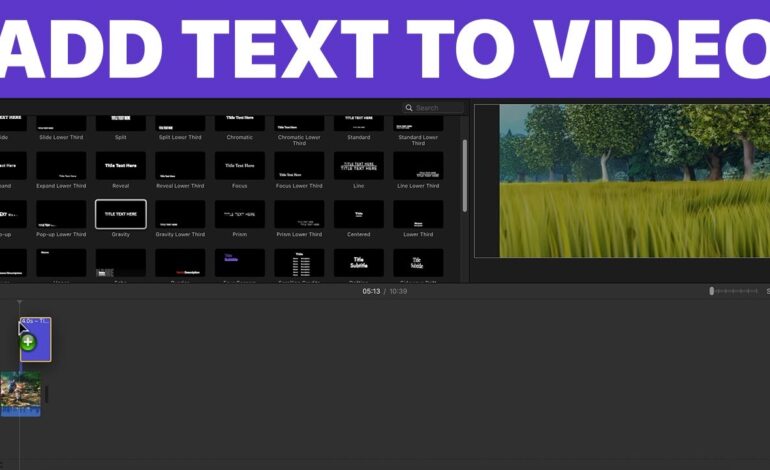
Look for software offering basic cutting and trimming tools, transitions, text overlays, and audio editing capabilities. Multi-track timeline support allows layering video, audio, and graphics. Color correction tools help enhance footage quality. Export presets for popular platforms like YouTube, Instagram, and TikTok streamline your workflow. Most modern software includes these features, but verify before committing.
Performance and Hardware Requirements
Video editing demands significant computer resources. Check the software’s minimum and recommended specifications against your hardware. 4K editing requires more powerful systems than 1080p content. Some software like Premiere Pro utilizes GPU acceleration for smoother performance, while others rely primarily on CPU power. DaVinci Resolve offers proxy workflows, allowing editing on less powerful machines. Consider upgrading your hardware if your computer struggles with your chosen software.
Mobile vs Desktop Editing
Mobile apps like CapCut, InShot, and LumaFusion enable editing on smartphones and tablets. These work excellently for social media content and quick edits but lack the precision and features of desktop software. Desktop applications provide superior control, larger screens for detailed work, and more powerful processing capabilities. Many creators use mobile apps for on-the-go editing and desktop software for primary projects.
Free Trial and Testing Period
Most paid software offers free trials ranging from 7 to 30 days. Utilize these trials to test multiple options before purchasing. Create actual projects rather than just exploring features. This hands-on experience reveals workflow efficiency, stability, and whether the software meets your needs. Test rendering times, export quality, and how intuitive the interface feels during real editing sessions.
Making Your Final Decision
After evaluating your needs, budget, hardware, and testing software options, select the program offering the best balance of features, usability, and value. Remember that switching software later is possible as your skills develop. Many professional editors started with basic programs before transitioning to advanced tools. Focus on developing fundamental editing skills rather than obsessing over having the most powerful software immediately.
Conclusion
Choosing video editing software as a beginner requires balancing multiple factors including cost, features, learning curve, and hardware compatibility. Start with options matching your current skill level and budget, then upgrade as your abilities and requirements grow. The best software is the one you’ll consistently use to create content, so prioritize ease of use and enjoyment over raw power when starting your editing journey.