Cinematic color grading has become one of the most important parts of modern video production. Whether you are editing short films, commercials, YouTube videos, documentaries, or social media content, the visual tone of your footage can completely change how viewers experience the story. A well-crafted grade creates mood, improves emotional depth, and gives footage a polished, professional finish.
In 2026, audiences expect high-quality visuals across every platform. Filmmakers and creators are now using advanced grading workflows to produce rich contrast, balanced skin tones, dramatic lighting, and film-inspired palettes. The good news is that you do not need a Hollywood budget to achieve these results. With the right process, anyone can create cinematic color grades that look refined and visually engaging.
This guide explains the complete workflow step by step while keeping the process practical and beginner-friendly.
Start With Properly Exposed Footage
Great cinematic grading begins before editing even starts. If your footage is underexposed, overexposed, or recorded with incorrect white balance, achieving a clean filmic result becomes difficult.
Whenever possible, shoot in a log profile or flat color profile. Formats like S-Log, C-Log, V-Log, or Blackmagic RAW preserve more dynamic range and provide greater flexibility during grading.
Focus on these essentials during filming:
- Avoid clipped highlights
- Keep skin exposure natural
- Use consistent white balance settings
- Shoot with controlled lighting
- Maintain accurate color temperature
Good footage creates a stronger foundation for the grading process and reduces unnecessary corrections later.
Organize Your Color Grading Workflow
Professional editors rarely jump directly into creative adjustments. Instead, they follow a structured workflow that separates technical corrections from artistic styling.
A typical cinematic grading workflow includes:
- Color correction
- Exposure balancing
- White balance adjustments
- Contrast shaping
- Skin tone refinement
- Creative look development
- Final polish
Working in layers keeps your image clean and prevents color contamination.
Many creators in 2026 use node-based workflows in editing software because they offer more control and flexibility when refining specific adjustments.
Correct Exposure Before Adding Style
One of the most common mistakes in color grading is applying cinematic LUTs before correcting the image. Always normalize exposure first.
Adjust these core elements:
Lift
Controls shadow detail and black levels.
Gamma
Manages midtones and overall image balance.
Gain
Affects highlights and brighter areas.
Aim for balanced contrast without crushing shadows or overblowing highlights. Cinematic footage usually retains some detail in dark regions while preserving soft highlight roll-off.
A properly balanced image creates a cleaner base for stylized grading.
Build Contrast With Intention
Contrast plays a major role in creating cinematic visuals. Flat images often feel lifeless, while excessive contrast can destroy detail and realism.
Modern cinematic grades typically use:
- Deep but controlled blacks
- Smooth highlight transitions
- Soft midtone contrast
- Natural skin separation
Instead of increasing global contrast aggressively, use curves to shape tonal depth gradually. This creates a more filmic appearance that feels organic rather than digitally harsh.
Subtle contrast adjustments often produce more professional results than extreme settings.
Refine White Balance and Color Temperature
Color temperature strongly influences emotional tone. Cooler tones can create tension or mystery, while warmer tones feel nostalgic and inviting.
For cinematic grading:
- Warm highlights can create emotional depth
- Cooler shadows add dimensionality
- Neutral skin tones maintain realism
Avoid pushing temperature adjustments too far. Balanced grading feels intentional rather than artificial.
Modern productions often use split-toning techniques where shadows and highlights contain different color biases for added cinematic richness.
Create a Signature Film Look
Once technical corrections are complete, you can begin crafting the creative style.
Popular cinematic looks in 2026 include:
Teal and Orange
Enhances skin separation and visual contrast.
Muted Earth Tones
Common in dramatic storytelling and documentaries.
High-Contrast Neo Noir
Features deep blacks with saturated highlights.
Soft Vintage Film Emulation
Inspired by analog cinema with faded contrast.
Clean Commercial Look
Bright, polished visuals with subtle saturation.
Rather than copying presets blindly, analyze why certain looks work emotionally within a scene.
Strong cinematic grades support storytelling rather than overpowering it.
Use LUTs Carefully
LUTs can speed up workflow, but they should never replace proper grading skills.
A cinematic LUT works best when:
- Exposure is already balanced
- White balance is corrected
- Contrast is controlled
- Skin tones are protected
Instead of applying LUTs at full strength, reduce opacity or blend them subtly into the image. Many professional colorists use LUTs only as starting points before making custom refinements.
Overusing LUTs often leads to unnatural colors, clipped shadows, and inconsistent footage.
Protect Natural Skin Tones
Even highly stylized cinematic grades should preserve believable skin tones. Poor skin correction instantly makes footage appear amateur.
Use selective adjustments to isolate skin areas without affecting the entire frame.
Important tips include:
- Avoid oversaturated reds
- Maintain healthy luminance
- Prevent orange color shifts
- Keep tones consistent across shots
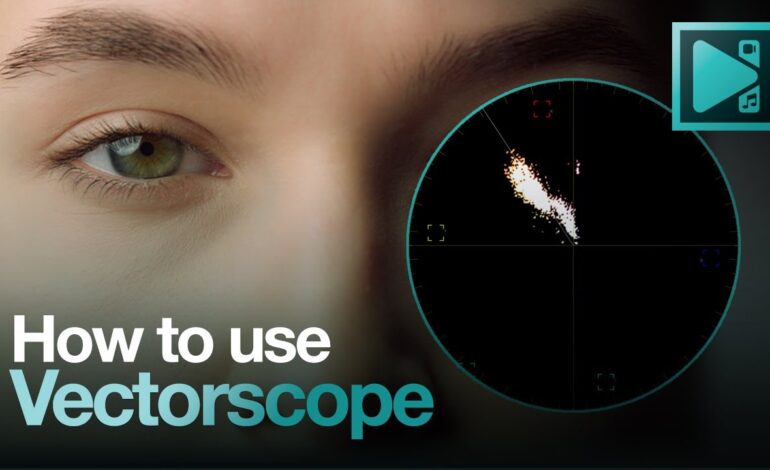
Vectorscopes can help monitor skin accuracy during grading.
Professional cinematic images usually feature controlled color palettes while keeping human subjects realistic and visually pleasing.
Add Depth With Secondary Adjustments
Secondary grading techniques allow you to shape viewer attention more effectively.
These tools help create cinematic depth:
Power Windows
Brighten or darken selected areas.
Vignettes
Draw focus toward the subject.
Color Isolation
Emphasize specific colors within the frame.
Glow Effects
Enhance highlights softly.
Grain Overlays
Simulate analog film texture.
Film grain remains especially popular in 2026 because it softens digital sharpness and creates a more organic appearance.
Subtle enhancement works better than excessive visual effects.
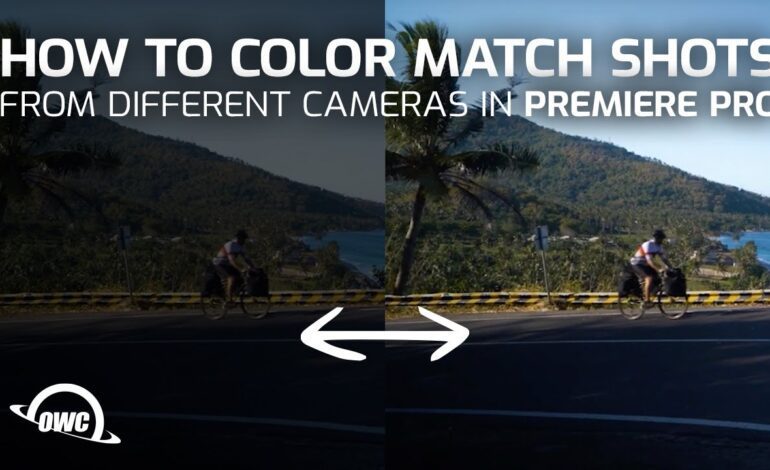
Match Shots for Visual Consistency
Cinematic storytelling depends on continuity. Even beautiful grades can fail if shots do not match properly.
When matching clips:
- Compare exposure levels
- Maintain consistent contrast
- Balance skin tones evenly
- Align color temperature
- Monitor saturation carefully
Professional productions often use reference stills to maintain consistency across scenes.
A cohesive sequence feels more cinematic than isolated “good-looking” shots.
Finalize the Grade for Delivery
Before exporting, review your footage on multiple screens if possible. Colors may appear different on phones, laptops, TVs, and calibrated monitors.
Check for:
- Crushed blacks
- Clipped highlights
- Oversaturation
- Noise artifacts
- Inconsistent tones
Modern delivery platforms like YouTube, Netflix, Instagram, and TikTok compress footage differently, so balanced grading is essential for maintaining quality across devices.
Export using high-quality codecs to preserve detail and color accuracy.
Why Cinematic Color Grading Matters More in 2026
Visual storytelling continues evolving rapidly. Audiences are consuming more content than ever, making visual quality a major competitive advantage for creators.
Cinematic color grading helps:
- Increase viewer retention
- Build emotional engagement
- Improve production value
- Strengthen brand identity
- Create professional visual consistency
From indie filmmakers to content creators, mastering cinematic grading is now a valuable creative skill that can elevate any project.
Conclusion
Creating cinematic color grades step by step is not about applying random filters or heavy effects. It is a structured process that combines technical correction, visual storytelling, and artistic refinement.
By focusing on exposure balance, controlled contrast, realistic skin tones, intentional color palettes, and consistent shot matching, you can achieve professional-looking results that feel immersive and emotionally powerful.
As cinematic trends continue evolving throughout 2026, creators who understand the fundamentals of color grading will stand out with cleaner visuals, stronger storytelling, and more engaging content across every platform.